Certificate in Graphic Design
School of the Museum of Fine Arts
Today’s fast-paced ever-changing world relies heavily on digital and visual forms of communication. Knowledge of design practices and principles of graphic design continue to be essential tools for designers and professionals alike. In just two semesters, the Certificate in Graphic Design provides you with the practical and theoretical skills of a design professional. You will learn the skills needed to succeed as a graphic designer while mastering theoretical frameworks.
Introduction to Graphic Design
This intensive course explores the potential of graphic design. We will focus on the creation of a concept to amplify content while also developing sensitivity to the relationships between typography and image, symbolism, language, and text. Throughout the course, emphasis will shift from idea generation and design theory to technical skills. Lectures on creativity, design and color theory, graphic design and letterform history and typography are a regular part of the course. There will be some use of the Macintosh computer in class to develop work. The course will focus on the harmonization of all elements of design with a conscious understanding of the intention with which elements are chosen, organized and created. The course accommodates beginners and more advanced students who are building a portfolio.
Tools: Adobe Illustrator and Photoshop.
Instructor: Matt Templeton
Introduction to Web Design
This introductory course will lead to the knowledge of creating and organizing letters, words,
sentences and paragraphs to visually communicate an idea, and promises to help develop your
creative processes in new and powerful ways. Topics include the anatomy of letterforms, type
history and classification systems, how to choose type, legibility, readability and the expressive
qualities of type. Course methods include discussions and critiques, slide show lectures and
demonstrations, as well as hands-on problem-solving exercises and assignments. While this is
not a software-based course, there will be frequent use of Macintosh computers. This course is
suitable for beginning and intermediate graphic designers or individuals developing their
professional skills in visual communications.
Tools: Adobe Illustrator, Adobe In-Design
Instructor: Karen Stein
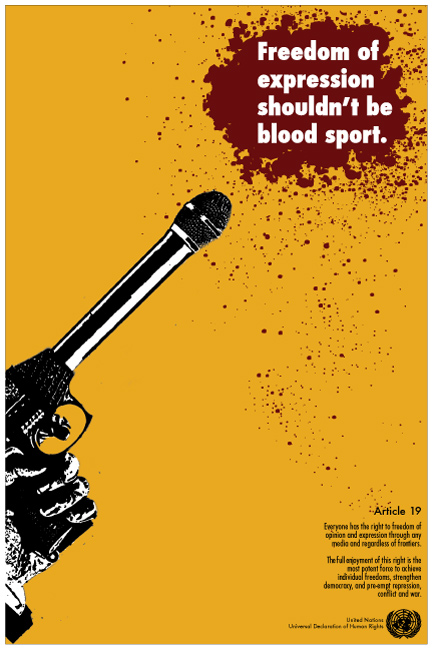
I chose to illustrate Article 19.
Everyone has the right to freedom of opinion and expression; this right includes freedom to hold opinions without interference and to seek, receive and impart information and ideas through any media and regardless of frontiers.
Topography
This introductory course will lead to the knowledge of creating and organizing letters, words, sentences and paragraphs to visually communicate an idea, and promises to help develop your creative processes in new and powerful ways. Topics include the anatomy of letterforms, type history and classification systems, how to choose type, legibility, readability and the expressive qualities of type. Course methods include discussions and critiques, slide show lectures and demonstrations, as well as hands-on problem-solving exercises and assignments. While this is not a software-based course, there will be frequent use of Macintosh computers. This course is suitable for beginning and intermediate graphic designers or individuals developing their professional skills in visual communications.
Tools: Adobe Illustrator, Adobe In-Design
Instructor: Karen Stein
I chose to illustrate Article 19.
Everyone has the right to freedom of opinion and expression; this right includes freedom to hold opinions without interference and to seek, receive and impart information and ideas through any media and regardless of frontiers.
Color Photography and the Digital Darkroom
This Adobe Photoshop-based course offers a technical and creative introduction to the use of color, color theory, digital capture and scanning film or slide negatives for color photography, and is appropriate for students who have completed a foundation photography course. You will learn how to use your digital cameras through raw processing and scanning film negatives and will also learn how to make a perfect print.
The class will spend time learning what digital technology is, and how to expose, process and resize images for proper output. Students will learn the fundamentals of color correcting, digital retouching, input and output resolution and optimizing files for printing on a variety of papers. In this project-based class, the instructor aims for technical understanding and production as a means to develop your unique voice and vision. Class time will be devoted to working in the “digital darkroom,” looking at historical and contemporary color photography and reviewing your work. By the end of the course you will have a portfolio of finished color prints that represent the expression and resolution of a cohesive idea.
You may use digital or film camera technology in this course.
Tools: Adobe Photoshop
Instructor: Christine Rogers
I chose to illustrate Article 19.
Everyone has the right to freedom of opinion and expression; this right includes freedom to hold opinions without interference and to seek, receive and impart information and ideas through any media and regardless of frontiers.
Intermediate Graphic Design
This intermediate-level course is for students who have taken Introduction to Graphic Design and seek to cultivate a deeper understanding of graphic design as a form of visual communication and as a profession while completing portfolio pieces. It emphasizes hands-on work informed by critical analysis to help students develop a repertoire of problem-solving techniques, professional practices, and efficient work habits. Class projects center on constructing integrated branding and wayfinding systems as a means to explore design’s communicative and cultural foundations. Discussions about work in progress consider the ways typography, color, imagery, layout, concept, and especially content all shape the meanings and appearance of our work — from inception to completion.
Tools: Adobe Illustrator, Adobe In-Design
Instructor: Joanne Breiner
[3d-flip-book mode=”large-lightbox” urlparam=”fb3d-page” id=”3900″ title=”false” lightbox=”dark”]
[3d-flip-book mode=”thumbnail-lightbox” urlparam=”fb3d-page” id=”3900″ title=”false” lightbox=”dark”]
Intermediate Web Design
This introductory course will lead to the knowledge of creating and organizing letters, words,
sentences and paragraphs to visually communicate an idea, and promises to help develop your
creative processes in new and powerful ways. Topics include the anatomy of letterforms, type
history and classification systems, how to choose type, legibility, readability and the expressive
qualities of type. Course methods include discussions and critiques, slide show lectures and
demonstrations, as well as hands-on problem-solving exercises and assignments. While this is
not a software-based course, there will be frequent use of Macintosh computers. This course is
suitable for beginning and intermediate graphic designers or individuals developing their
professional skills in visual communications.
Tools: Adobe Illustrator, Adobe In-Design
Instructor: Karen Stein
I chose to illustrate Article 19.
Everyone has the right to freedom of opinion and expression; this right includes freedom to hold opinions without interference and to seek, receive and impart information and ideas through any media and regardless of frontiers.
Introduction to 2D Design
This introductory course will lead to the knowledge of creating and organizing letters, words,
sentences and paragraphs to visually communicate an idea, and promises to help develop your
creative processes in new and powerful ways. Topics include the anatomy of letterforms, type
history and classification systems, how to choose type, legibility, readability and the expressive
qualities of type. Course methods include discussions and critiques, slide show lectures and
demonstrations, as well as hands-on problem-solving exercises and assignments. While this is
not a software-based course, there will be frequent use of Macintosh computers. This course is
suitable for beginning and intermediate graphic designers or individuals developing their
professional skills in visual communications.
Tools: Adobe Illustrator, Adobe In-Design
Instructor: Karen Stein
I chose to illustrate Article 19.
Everyone has the right to freedom of opinion and expression; this right includes freedom to hold opinions without interference and to seek, receive and impart information and ideas through any media and regardless of frontiers.
Digital Collage
Learn to make better photographs using a digital single-lens reflex camera. Through demonstrations, exercises, and individual assignments, you can expect to become more confident as you make technical and conceptual decisions. Each week we will learn about DSLR operation, processes and terminology. Whether your interest is in photography for exhibition, documentation, or personal growth, this course provides a solid foundation for further exploration.